Subscription Finder
A Salesforce app that tells people whether their organisation already has access
Subscription Finder is a small Salesforce app that lets people check whether their organisation already has access to a subscription. If they have access, they contribute to existing business, if they don’t, they’re a lead for new business.
The app is fairly niche, but I wanted to test if I would be able to go from a rough idea to a working tool using an AI coding agent. This is something I can apply to all sorts of marketing problems, from capturing and routing leads to building campaign tools and even campaigns themselves.
What it is
If you sell subscriptions to whole organisations there’s often a common problem. Plenty of people at your customers are entitled to access and have no idea. They never sign up, or they get in touch with support to ask, and the unused licences come back to bite at renewal time.
Subscription Finder gives them an easy way to find out. They enter their work email address on a form, the app checks it against the customer list, and they get an email back with either a sign-up link or details on how to get access.
It’s a tool I’d seen B2B subscription businesses need, so it felt like a good thing to learn on. Everything was built from scratch with made-up data, and I’m not planning to sell it.
Why Salesforce?
You could build a basic version of this with a spreadsheet of email domains, but spreadsheets go out of date quickly. Customer records and contract dates already live in the CRM, so it made more sense to build the app there. When a customer renews or a contract ends, the answer people get changes with it, and nobody has to remember to update a separate list. Customer data never leaves Salesforce either.
I also built it to the standard Salesforce expects of apps on its AppExchange marketplace. I’m not listing it there, but working to that bar was a big part of what I wanted to learn.
How it works
1. Setting up a customer
The account team add a customer’s email domains, the date their access ends and their sign-up link, all from a panel on the customer’s account in Salesforce.
salesforce.com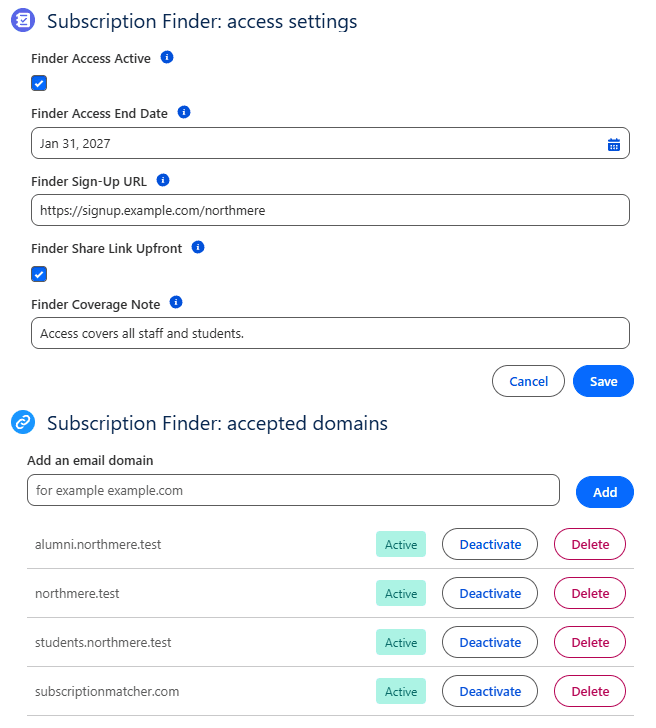
The Subscription Finder panel on a customer account in Salesforce. 2. The form
Someone finds the form on the company’s website and enters their work email. Whatever the outcome, they see the same message on screen asking them to check their inbox.
example.com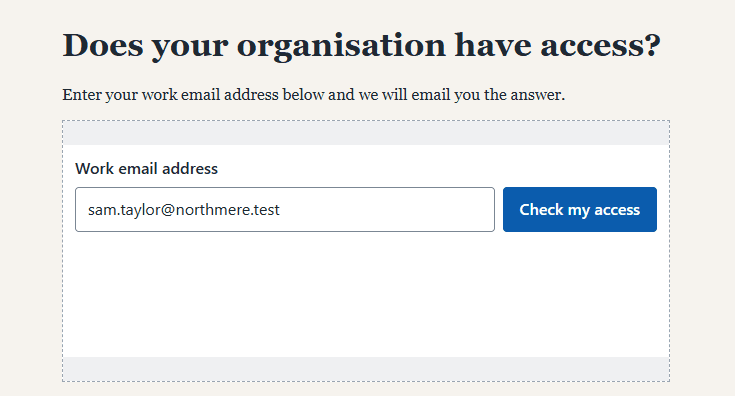
The form, shown on a test website. 3. The emails
Salesforce checks the email domain against the customer list and sends the answer to that address only. If there’s a match, the email includes the sign-up link.
mail.google.com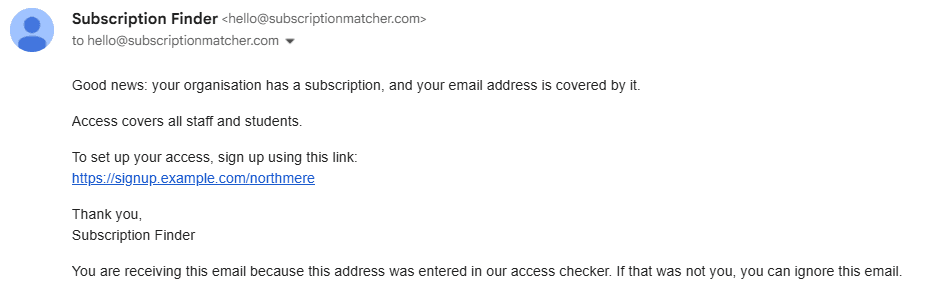
The email someone gets when their organisation has access. 4. The log
Every request is logged, so the team can see who’s been looking. People at existing customers are a chance to grow usage before renewal, and people from organisations that aren’t customers yet are new business leads.
How I built it
Before any code was written, I set out what I wanted in a brief: the problem, who it was for, and what would and wouldn’t be in the first version. Then I built it in small pieces, making sure each one worked before moving on to the next.
Claude Code wrote the code. My job was deciding what to build, making calls along the way when the brief wasn’t clear, and testing that it actually worked, a lot like managing a project with an agency.
What I learned
- The brief does the heavy lifting. Claude Code was only as good as the instructions I gave it. When the brief was clear, the work was quick. When it was vague, I got something that technically worked but missed the point.
- QA is still important. Passing tests aren’t the whole story. A few things worked fine in testing and then broke the first time a real visitor tried them.
- Deliverability matters everywhere. The first emails went straight to spam until I set up proper email authentication on my own domain.
- Leaving things out is a decision. Some of the most useful choices were about what not to build. Plenty of good ideas went on a list for later so the first version could stay simple.
The biggest takeaway for me is that the gap between having an idea and making it a reality is much smaller than it was. With the right guardrails, marketers can build more of what they need themselves, whether that’s interactive content for campaigns, better ways to capture and route leads or internal tools that save the team time.
Contact
The best way to reach me is by email or on LinkedIn.
 LinkedIn